
- InputArena – Compare Mouse & Keyboard
- All Gadgets
- Compare
- Lofree Flow84 vs Lofree Flow100
Lofree Flow84 vs Lofree Flow100
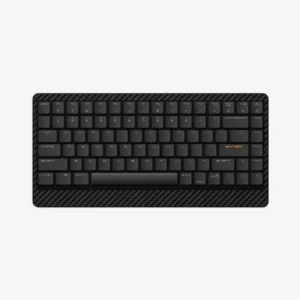
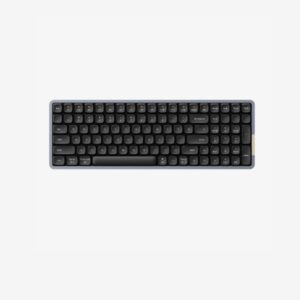
Lofree Flow84 vs Lofree Flow100
Lofree Flow84 vs Lofree Flow100 is a comparison about typing feel, layout practicality, customization and desk fit. The right choice depends on whether you want a compact low-profile board, a more premium build, stronger software support, longer battery life or a specific switch feel. Use the guide below to compare the actual ownership experience, not only the raw specs. The imported comparison notes highlight: Lofree Flow84 vs Flow100: Compare 75% vs 96% low-profile keyboards—switches, size, battery. Slim aluminum design, POM switches, 40hr battery. Pick compact or full-featured!
⚖️ Key Differences
- Lofree Flow84 should be judged by its typing feel, layout comfort, battery claim and how well it fits your existing desk setup.
- Lofree Flow100 should be judged by its switch system, build quality, software support and whether its extra features improve daily use.
- Low-profile boards usually win for portability and wrist comfort, while taller or hybrid boards can feel more customizable and deeper-sounding.
- For productivity, layout and key placement matter more than RGB; for gaming, polling rate, latency mode and stable wireless matter more.
- Before buying, confirm the exact switch option, hot-swap compatibility, keycap profile, OS layout and warranty for your region.
| Lofree Flow84 – Full specification | Lofree Flow100 – Full specification | |
|---|---|---|
| Overview | ||
| Price | — | $129.00 |
| Our Rating | ||
| Brand | lofree | lofree |
| Category | Keyboard | Keyboard |
| Genral Info | ||
| Brand | Lofree | Lofree |
| Model Name | Flow84 | Flow100 |
| Series | Flow Series | Flow Series |
| Type | Mechanical (Wireless + Wired) | Mechanical (Wireless + Wired) |
| Layout | 75% (84 keys) | 75% (Compact) |
| Release Year | 2024 | 2024 |
| Use Case | Work, Typing, Creative, Productivity | Work, Travel, Productivity, Light Gaming |
| DESIGN & BUILD | ||
| Frame Material | Aluminum alloy unibody | Aluminum top housing + polycarbonate base |
| Plate Material | PC (polycarbonate) | Steel |
| Keycap Material | PBT (Low-profile double-shot) | PBT (Low-profile, double-shot) |
| Color Options | White, Basalt Black, Mist Blue | White, Graphite, Mist Blue |
| Dimensions (L × W × H) | 316 × 125 × 26 mm | 320 × 135 × 28 mm |
| Weight | 820 g | 820 g |
| Form Factor | Compact 75% layout | Compact 75% |
| Finish | Smooth anodized surface with matte edges | Matte anodized coating |
| SWITCH & TYPING EXPERIENCE | ||
| Switch Type | Low-profile mechanical (hot-swappable) | Mechanical (Hot-swappable, Low-profile) |
| Switch Options | Lofree Ghost Linear / Ghost Tactile (Kailh low-profile compatible) | Lofree Ghost Linear / Phantom Tactile |
| Mount Type | Gasket-mounted structure | Gasket mount with internal foam dampening |
| Stabilizers | Pre-lubed plate-mounted stabilizers | Pre-lubed plate-mounted stabilizers |
| Typing Angle | 6° fixed incline | Adjustable (2 levels) |
| Key Rollover | Full N-key (wired) / 6-key (Bluetooth) | Full N-key (wired) / 6-key (Bluetooth) |
| Actuation Force | 45 g ± 10 g | 45 g (linear) / 50 g (tactile) |
| Key Travel | 1.2 mm actuation / 2.8 mm total | 1.8 mm actuation / 3.2 mm total |
| Typing Feel | Low-profile, soft, responsive, and quiet | Low-profile, quiet, and crisp with deep feedback |
| PERFORMANCE | ||
| Response Time (Bluetooth) | 8–10 ms (Bluetooth) | 8–10 ms |
| Response Time (Bluetooth) | 8–10 ms (Bluetooth) | 8–10 ms |
| Anti-Ghosting | 100% NKRO | 100% (NKRO) |
| Input Lag | Minimal (Performance Mode) | Negligible (Optimized Gaming Mode) |
| Latency Mode | Adjustable Low-latency mode | Low-latency mode toggle switch |
| RGB & LIGHTING | ||
| Backlight Type | White LED (adjustable) | Per-key RGB |
| LED Orientation | South-facing | South-facing |
| Lighting Effects | 10 preset animation modes | 20+ preset lighting animations |
| Custom Effects | Supported via companion software | Supported via Lofree Configurator App |
| Brightness Levels | 5-step brightness control | 5-step adjustable |
| Control | Onboard shortcuts + software | Software + onboard function shortcuts |
| SOFTWARE & CUSTOMIZATION | ||
| Firmware | Lofree OS (custom, VIA-compatible) | Compatible with QMK / VIA (experimental support) |
| Key Remapping | Yes (via software) | Fully programmable |
| Macro Support | Supported | Yes |
| Profile Storage | 3 onboard profiles | 3 onboard profiles |
| Firmware Update | Available via USB | Yes, via USB-C |
| Hotkey Shortcuts | Lighting, media, function layer toggles | Brightness, lighting, volume, RGB presets |
| SOUND & COMFORT | ||
| Acoustic Dampening | Integrated foam and silicone pad under PCB | Silicone and EVA foam layers |
| Typing Sound Profile | Soft “thock” with muted bottom-out | Soft thock with low resonance |
| Gasket Mount | Gasket mount adds flexible cushioning | Enhanced gasket mount and foam |
| Noise Reduction | Internal insulation layers for noise reduction | Stabilizer and case foam optimized |
| Wrist Rest | Optional magnetic rest (sold separately) | Optional magnetic wrist rest |
| Tilt Feet | Rubber base pads for stability | Dual-level adjustable |
| Support and compatibility | ||
| Software Support | macOS, Windows, Linux, Android, iOS | macOS, Windows, Linux, Android, iOS |
| Supported OS | — | Lofree Configurator App (cross-platform) |
| Plug-and-Play | Yes | Yes (driverless) |
| Layout Options | macOS / Windows legends included | macOS / Windows swap keycaps included |
| BATTERY & CONNECTIVITY | ||
| Battery Capacity | 2000 mAh | 4000 mAh |
| Battery Type | Rechargeable lithium-ion | Rechargeable lithium battery |
| Battery Life (No RGB) | Up to 40 hours | Up to 220 hours |
| Battery Life (RGB On) | 10–15 hours | 80–90 hours |
| Charging Port | USB Type-C | USB Type-C |
| Charge Time | 2.5 hours | 3.5 hours |
| Wireless Mode | Bluetooth 5.1 | Bluetooth 5.2 |
| Wired Mode | USB-C cable | USB-C connection |
| Multi-Device Pairing | Yes, up to 3 devices | Up to 3 devices |
| Switch Between Devices | Fn + 1/2/3 shortcuts | Fn + 1/2/3 shortcuts |
| Polling Rate (Wired) | 1000 Hz | 1000 Hz |
| Polling Rate (Wireless) | 125 Hz | 125 Hz |
🧾 Side-by-Side Buying Summary
Choose Lofree Flow84 if its layout, switch feel and price make more sense for your daily typing. It is the safer pick when you want the comparison to stay practical: comfortable keys, reliable wireless and a familiar layout.
Choose Lofree Flow100 if its build, software, switch technology or battery package gives you a clear advantage. It is the better pick when you will actually use the customization or premium typing features.
Both keyboards should be compared by ownership details: key spacing, stabilizer feel, sound profile, battery with lighting, firmware support and replacement keycap availability.
⚡ Performance Comparison
Lofree Flow84 should feel strong for productivity if it gives consistent wireless, comfortable key travel and a layout that reduces mistakes. For gaming, check its polling rate and latency mode rather than assuming all wireless keyboards behave the same.
Lofree Flow100 is the stronger performance choice if it offers better polling, lower latency, Hall Effect control, QMK/VIA support or more predictable switch tuning. Those advantages matter most when you customize keys or play fast games.
Look closely at 40hr. A keyboard can be technically impressive but still less useful if the layout slows you down or the switch feel does not suit your typing style.
🧩 Design & Build Comparison
Lofree Flow84 works best if you like its case height, angle and layout spacing. Portable boards can be easier on the wrist and better for mixed laptop/desktop setups.
Lofree Flow100 works best if you prefer its build material, acoustic design, gasket/foam setup or layout extras. A heavier or more premium case can sound better but may be less portable.
Compare size, case material, keycap profile, stabilizers and weight. A compact layout saves desk space, while a larger layout may be better if you rely on function keys, navigation keys or a number cluster.
🔌 Connectivity / Compatibility Notes
Lofree Flow84 is better if it connects quickly across your main devices and keeps stable battery life without constant software setup.
Lofree Flow100 is better if it offers stronger multi-device support, 2.4GHz gaming mode, Bluetooth flexibility or deeper remapping support.
Check Windows/Mac layout support, Bluetooth device count, 2.4GHz receiver availability, USB-C wired mode, VIA/QMK support and whether remapping works without always running software.
👥 Who Should Choose Which?
- You prefer the typing angle, size and layout of Lofree Flow84.
- You want a practical keyboard for daily writing, office work or travel.
- You do not need deep firmware customization or special gaming switch features.
- It is cheaper while still offering the switch feel and battery life you need.
- You want the specific upgrades offered by Lofree Flow100, such as better software, build, switches or wireless mode.
- You plan to remap keys, tune the layout or use the keyboard for both gaming and productivity.
- You prefer its sound profile, case material or typing feel.
- The price gap is small enough that the extra features will be used regularly.
🛒 Practical Buying Advice
Do not choose only by brand or RGB. For Lofree Flow84 and Lofree Flow100, the best buy is the board whose layout you can use without mistakes every day. Check the exact switch option, hot-swap limits, keycap compatibility, battery life with backlight, software support and return policy. If you type for long hours, prioritize comfort and sound; if you game, prioritize stable 2.4GHz mode and latency.
🏆 Winner by Use Case
whichever board has your preferred switch feel and key height — test this before prioritizing specs.
Lofree Flow100 — choose it if its firmware or switch system gives more control.
Lofree Flow84 — choose it if it is slimmer, lighter or easier to pair with a laptop.
the cheaper board if both offer the layout, wireless mode and battery life you need.
❓ Frequently Asked Questions
Is Lofree Flow100 a clear upgrade over Lofree Flow84?
Only if its layout, switches, software or build improvements solve something you care about.
Which keyboard is better for typing?
Choose the one with the switch feel, key spacing and case angle you find comfortable. Specs alone cannot decide typing comfort.
Which one is better for gaming?
Prefer the model with stable 2.4GHz/wired mode, lower latency and the switch technology you need for fast inputs.
What should I verify before purchase?
Confirm layout, switch option, hot-swap support, OS compatibility, keycap profile, battery with lighting and warranty.
🏁 Final Verdict
Pick Lofree Flow100 if its upgrades are features you will use every week, not just nice-to-have items in a spec table. Pick Lofree Flow84 if it gives you the right layout, typing feel and battery life at a better price. In this comparison, the smarter choice is the keyboard that improves your real typing routine with the fewest compromises.
✅ Source / Verification Notes
- Manual guide data is stored in the APS comparison guide meta fields, not only in post content.
- Use the product pages and seller listing to verify final specs, price, included accessories and regional variants before publishing.
- This text avoids lab-test claims unless those claims are present in your own product data or verified source notes.