Skip to content
  1. InputArena – Compare Mouse & Keyboard
  2. All Gadgets
  3. Keyboard
  4. ATTACK SHARK R85 HE – Full Specification
Keyboard
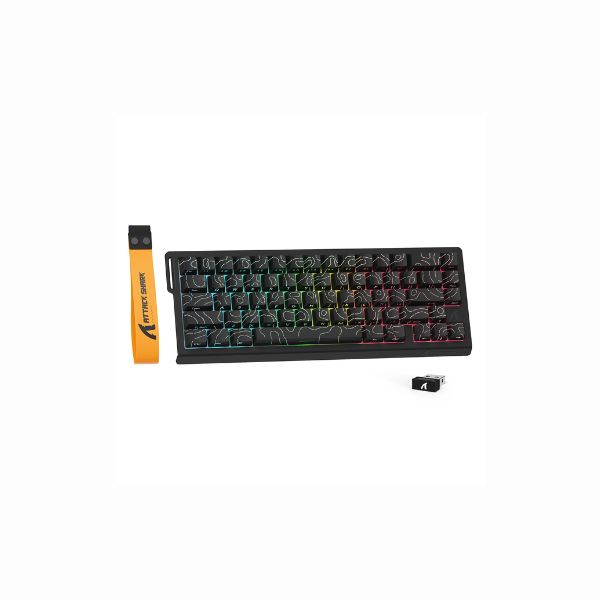
ATTACK SHARK R85 HE – Full Specification
attack-shark Keyboard SKU: R85HE

ATTACK SHARK R85 HE – Full Specification

$58.98
Available Official 8.6/10Excellent
  • Switches Magnetic Hall Effect (Hot-swappable)
  • Backlight South-facing RGB + Lightbox
  • Mode Wired only
View Full Specs

ATTACK SHARK R85 HE — Manual Keyboard Buying Guide

ATTACK SHARK R85 HE is a 75% (79 keys) keyboard built for Gaming, Competitive FPS. Its strongest listed points are Magnetic Hall Effect (Hot-swappable), 75% (79 keys), Wired only / USB-C. The main trade-off is the need to confirm the exact version, layout and switch option before buying. Use this page as a buying guide based on the supplied specifications; it does not claim direct physical testing.

Pros & Cons

Pros
  • 75% (79 keys) layout fits Gaming, Competitive FPS
  • Listed switch setup: Magnetic Hall Effect (Hot-swappable)
  • Connectivity support: Wired only
  • Backlight listed: South-facing RGB + Lightbox
  • Customization support: Windows, macOS
  • Build details listed: ABS Plastic shell
Cons
  • No dedicated number pad for spreadsheet or data-entry users
  • Battery runtime should be verified from the official source

Our Rating The overall rating is based on review by our experts

8.6
/ 10 Excellent
Design 10
SWITCH 10
PERFORMANCE 9
BATTERY 6
Connectivity 8

Specifications

Genral Info

Brand ATTACK SHARK
Model Name R85 HE
Series HE Series (Rapid Trigger)
Type Mechanical (Wired Magnetic Hall Effect)
Layout 75% (79 keys)
Release Year 2025
Use Case Gaming, Competitive FPS

DESIGN & BUILD

Frame Material ABS Plastic shell
Plate Material Optimized lightweight plate
Keycap Material PBT Double-shot
Color Options Black (custom lightbox)
Dimensions (L × W × H) Compact 75%
Weight Ultra-lightweight
Form Factor 75% with multimedia knob
Finish Matte texture

SWITCH & TYPING EXPERIENCE

Switch Type Magnetic Hall Effect (Hot-swappable)
Switch Options N-pole downward magnetic switches
Mount Type Not specified
Stabilizers Pre-configured
Typing Angle Fixed
Key Rollover Full NKRO
Actuation Force Adjustable contactless actuation
Key Travel 0.1–3.3 mm adjustable
Typing Feel Rapid trigger, zero dead zone

PERFORMANCE

Response Time (Bluetooth) Ultra-low latency
Anti-Ghosting 100% NKRO
Input Lag 0.08 ms
Latency Mode 8000 Hz polling, 256 kHz scan rate

RGB & LIGHTING

Backlight Type South-facing RGB + Lightbox
LED Orientation South-facing
Lighting Effects Custom RGB effects
Custom Effects Web driver configurable
Brightness Levels Adjustable
Control Software + onboard

SOFTWARE & CUSTOMIZATION

Firmware qmk.top web driver
Key Remapping Fully adjustable actuation
Macro Support Yes
Profile Storage Multiple profiles
Firmware Update Web-based
Hotkey Shortcuts RT, Snap Tap, DKS, MT, TGL

SOUND & COMFORT

Acoustic Dampening Sound-dampened build
Typing Sound Profile Gaming optimized
Gasket Mount No
Noise Reduction Improved dampening
Wrist Rest No
Tilt Feet Fixed typing angle

Support and compatibility

Software Support Windows, macOS
Plug-and-Play Yes
Layout Options Standard gaming layout

BATTERY & CONNECTIVITY

Battery Capacity None
Battery Type N/A
Battery Life (No RGB) N/A
Battery Life (RGB On) N/A
Charging Port USB Type-C
Charge Time N/A
Wireless Mode Wired only
Wired Mode USB-C
Multi-Device Pairing No
Switch Between Devices N/A
Polling Rate (Wired) 8000 Hz
Polling Rate (Wireless) N/A

⚡ Real-World Performance Analysis

Wired Polling
8000 Hz
Use wired mode when you want the most stable response.
Wireless Polling
Ultra-low latency
Wired Mode
USB-C
Use wired mode when you want the most stable response.
Typing Response

ATTACK SHARK R85 HE should be judged by its Magnetic Hall Effect (Hot-swappable) feel, layout comfort and stabilizer/keycap setup. Listed typing feel: Rapid trigger, zero dead zone. Listed actuation detail: Adjustable contactless actuation. This is spec-based guidance, not a direct physical test claim.

Latency Notes

For latency-sensitive use, rely only on the listed wired or 2.4 GHz information and avoid presenting Bluetooth or polling numbers as tested performance unless measured.

Daily Use

For daily use, judge ATTACK SHARK R85 HE by layout comfort, switch feel, OS support and the keys you actually need. Specs help shortlist the keyboard, but comfort depends on desk setup and typing preference.

📐 Layout Guide — Is This the Right Size For You?

Layout75% (79 keys)
KeysCompact layout; no dedicated number pad
Best UseCompact productivity and gaming

A 75% layout keeps many useful keys in a compact footprint. It is good for users who want function-row access without a full TKL width.

Good fit if

  • You want a compact desk setup with useful dedicated keys.
  • You can live without a number pad.
  • You want more mouse space without going too minimal.

Consider another size if

  • You need a full navigation cluster or number pad.
  • You dislike compact key spacing.
  • You want the simplest familiar keyboard layout.

🧩 Switch & Build Quality — What You're Actually Getting

Switch
Magnetic Hall Effect (Hot-swappable)
Check the exact switch variant before buying.
Actuation
Adjustable contactless actuation
Use this only as listed-spec information.
Key Travel
0.1–3.3 mm adjustable
Travel/feel can change by switch version.
Frame
ABS Plastic shell
Plate
Optimized lightweight plate
Keycaps
PBT Double-shot
Stabilizers
Pre-configured

ATTACK SHARK R85 HE uses Magnetic Hall Effect (Hot-swappable). Final sound and feel depend on the exact switch option, keycaps, stabilizers and case construction. Listed build details include frame/body: ABS Plastic shell; plate: Optimized lightweight plate; keycaps: PBT Double-shot; stabilizers: Pre-configured; sound profile: Gaming optimized.

🎮 Gaming Use Cases — How Does It Perform?

🎯FPS / Competitive Aim
Strong on paper

For FPS games, the magnetic/Hall Effect switch listing can be useful if adjustable actuation is supported and configured correctly.

🧙MOBA / RPG Shortcuts
Good

For MOBA and RPG games, this keyboard should work well if the layout gives you enough dedicated keys or easy layers for shortcuts.

🕹️Casual Gaming
Good

For casual gaming, the main factors are comfort, switch feel and connection stability rather than maximum spec numbers.

🏆Competitive Notes
Verify setup

For competitive gaming, prefer wired or verified 2.4 GHz mode where available. Do not rely on Bluetooth for latency-sensitive play unless tested.

👤 Who Should Buy This Keyboard?

Buy if

  • You want a 75% (79 keys) keyboard for Gaming, Competitive FPS.
  • You like the listed Magnetic Hall Effect (Hot-swappable) setup.
  • You are willing to verify the exact regional/layout version before buying.
  • You plan to use the listed customization/software support: qmk.top web driver.

Skip if

  • You need the cheapest possible basic keyboard.
  • The listed layout does not include keys you use every day.
  • You are not ready to verify switch, layout and warranty details before ordering.

🛒 Practical Buying Advice

Before Buying

Before buying ATTACK SHARK R85 HE, confirm the exact layout, switch version, regional key legends, included accessories and warranty. Keyboard names can have multiple variants.

Value Check

ATTACK SHARK R85 HE gives the most value if you will actually use its 75% (79 keys) layout, Magnetic Hall Effect (Hot-swappable) setup and listed connection/software features. If you only need basic typing, a simpler keyboard may be better value.

Best Configuration

Choose the switch and layout version that fits your typing style. For gaming, prioritize wired or verified 2.4 GHz mode if available; for work, prioritize comfort and OS support.

What to Verify

Layout: 75% (79 keys)
Switch: Magnetic Hall Effect (Hot-swappable)
Connectivity: Wired only / USB-C
Software: qmk.top web driver
Backlight: South-facing RGB + Lightbox
Battery: None
Dimensions: Compact 75%
Weight: Ultra-lightweight

Buying Call

Buy ATTACK SHARK R85 HE if the listed layout, switch feel and connectivity match your real desk setup. Skip it if you need a different size or only want a basic budget keyboard.

🏁 Final Verdict

ATTACK SHARK R85 HE: choose it if the layout and switch fit your workflow

ATTACK SHARK R85 HE is worth considering if you want a 75% (79 keys) keyboard with Magnetic Hall Effect (Hot-swappable) and the listed connectivity/software features. The safe decision depends on confirming exact version details and whether the layout fits your daily keys.

Layout: 75% (79 keys)Switch: Magnetic Hall Effect (Hot-swappable)Connection: Wired only / USB-CBest for: Gaming, Competitive FPS

💻 Compatibility & Software Notes

Software
qmk.top web driver
Supported OS
Windows, macOS
Backlight
South-facing RGB + Lightbox

Use the listed software and OS fields as compatibility guidance only. Verify firmware, remapping and wireless behavior from the official product page before publishing final claims.

🔁 Alternatives to Consider

Full

size keyboard: choose this if you need a number pad for daily work.

TKL keyboard

choose this if you want more mouse space while keeping navigation keys.

Compact 65%/75% keyboard

choose this if desk space and portability matter more than dedicated keys.

Basic office keyboard

choose this if price and simplicity matter more than customization.

✅ Source / Verification Notes

Before publishing, verify important fields against the official product page, manual or trusted retailer listing.

Confirm switch option, layout version, polling rate, battery, software support, dimensions, warranty and regional layout.

This page should not claim direct physical testing unless the product has actually been tested.

❓ Frequently Asked Questions

Reviews

  • Be the first to add a Review

    Please post a user review only if you have / had this product.

  • Rate this Product

  • 8
  • 9
  • 9
  • 9
  • 8
  • 6 / 10 based on your selection
Scroll to Top