
Skip to content
  1. InputArena – Compare Mouse & Keyboard
  2. All Gadgets
  3. Keyboard
  4. Corsair K65 Plus – Full specification
Keyboard
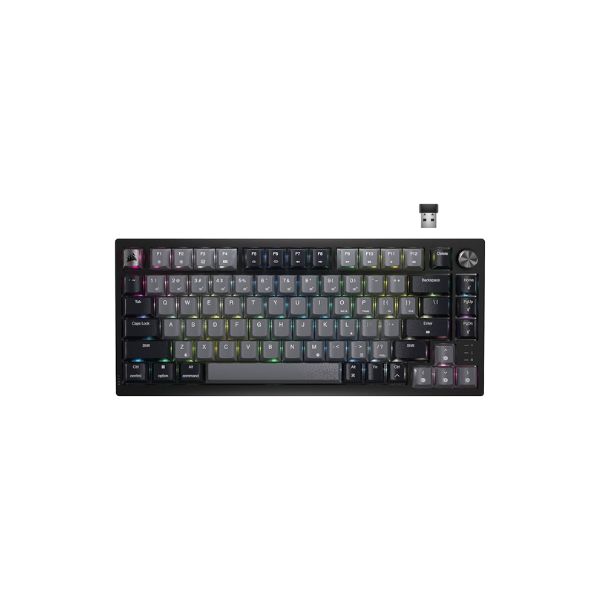
Corsair K65 Plus – Full specification
corsair Keyboard SKU: K65-PLUS-WL

Corsair K65 Plus – Full specification

$129.00
9.0/10Outstanding
  • Switches Mechanical (Hot-swappable)
  • Backlight Per-key RGB
  • Battery Life 60-70 hours
  • Mode Bluetooth 5.1 + 2.4 GHz Slipstream Wireless
View Full Specs

Corsair K65 Plus

Corsair K65 Plus is a 75% Compact Layout keyboard built for Gaming, Productivity, Work. Its main listed strengths are Mechanical (Hot-swappable), Bluetooth 5.1 + 2.4 GHz Slipstream Wireless / USB-C cable connection, Per-key RGB. The main trade-off is that there is no dedicated number pad. This overview is based on the stored specification fields and avoids hands-on testing claims.

Pros & Cons

Pros
  • 75% Compact Layout layout fits Gaming, Productivity, Work
  • Listed switch setup: Mechanical (Hot-swappable)
  • Connectivity support: Bluetooth 5.1 + 2.4 GHz Slipstream Wireless / USB-C cable connection
  • Backlight listed: Per-key RGB
  • Customization support: Corsair iCUE firmware (updatable)
Cons
  • Final buying decision depends on exact regional layout and switch variant

Our Rating The overall rating is based on review by our experts

9
/ 10 Outstanding
Design 10
SWITCH 9
PERFORMANCE 9
BATTERY 8
Connectivity 9

Specifications

Genral Info

Brand Corsair
Model Name K65 Plus Wireless
Series K-Series
Type Mechanical (Wireless + Wired)
Layout 75% Compact Layout
Release Year 2024
Use Case Gaming, Productivity, Work

DESIGN & BUILD

Frame Material Aluminum top plate + reinforced plastic chassis
Plate Material Steel
Keycap Material PBT double-shot shine-through
Color Options Black, White
Dimensions (L × W × H) 328 × 136 × 40 mm
Weight 950 g
Form Factor Compact 75%
Finish Brushed aluminum finish with matte texture

SWITCH & TYPING EXPERIENCE

Switch Type Mechanical (Hot-swappable)
Switch Options Corsair MLX Red / MLX Speed / MLX Silent
Mount Type Gasket mount with internal foam dampening
Stabilizers Pre-lubed plate-mounted stabilizers
Typing Angle Adjustable (3 levels)
Key Rollover Full N-key (wired) / 6-key (Bluetooth)
Actuation Force ~45g (depending on switch)
Key Travel 2.0 mm actuation / 4.0 mm total
Typing Feel Smooth linear travel with cushioned bottom-out

PERFORMANCE

Response Time (Bluetooth) 8-10 ms
Anti-Ghosting Full NKRO (wired)
Input Lag Negligible in Game Mode
Latency Mode Low-latency toggle supported

RGB & LIGHTING

Backlight Type Per-key RGB
LED Orientation South-facing
Lighting Effects 20+ preset modes
Custom Effects Supported via Corsair iCUE
Brightness Levels 5-step adjustable
Control Software + onboard shortcuts

SOFTWARE & CUSTOMIZATION

Firmware Corsair iCUE firmware (updatable)
Key Remapping Fully programmable
Macro Support Yes
Profile Storage Up to 3 onboard profiles
Firmware Update Supported via USB-C
Hotkey Shortcuts Lighting control, media functions, brightness

SOUND & COMFORT

Acoustic Dampening Multi-layer foam (top, plate, PCB)
Typing Sound Profile Muted with subtle thock
Gasket Mount Gasket Mount provides soft cushioned typing
Noise Reduction Preinstalled dampening foams
Wrist Rest Optional magnetic wrist rest
Tilt Feet Two-level adjustable

Support and compatibility

Software Support Windows, macOS
Plug-and-Play Yes
Layout Options Windows keycaps (macOS support via remapping)

BATTERY & CONNECTIVITY

Battery Capacity 4200 mAh
Battery Type Rechargeable lithium-ion
Battery Life (No RGB) Up to 180 hours
Battery Life (RGB On) 60-70 hours
Charging Port USB Type-C
Charge Time Approx. 3.5 hours
Wireless Mode Bluetooth 5.1 + 2.4 GHz Slipstream Wireless
Wired Mode USB-C cable connection
Multi-Device Pairing Yes, up to 3 devices
Switch Between Devices Fn + 1/2/3 shortcuts
Polling Rate (Wired) 1000 Hz
Polling Rate (Wireless) 250 Hz

⚡ Real-World Performance Analysis

Wired Polling
1000 Hz
Use wired USB mode when you want the most stable connection.
Wireless Polling
250 Hz
Use Bluetooth mainly for convenience and device switching; use 2.4 GHz or wired mode if listed and latency matters.
Wireless Mode
Bluetooth 5.1 + 2.4 GHz Slipstream Wireless
Use Bluetooth mainly for convenience and device switching; use 2.4 GHz or wired mode if listed and latency matters.
Wired Mode
USB-C cable connection
Use wired USB mode when you want the most stable connection.
Typing Response

Corsair K65 Plus should be judged by its Mechanical (Hot-swappable) feel, layout comfort and stabilizer/keycap setup. Listed feel: Smooth linear travel with cushioned bottom-out. This is spec-based guidance, not a direct physical test claim.

Latency Notes

For latency-sensitive use, prefer wired or verified 2.4 GHz modes when listed. Bluetooth should be treated as convenience-first unless measured testing proves otherwise.

Wireless Behavior

Use Bluetooth mainly for convenience and device switching; use 2.4 GHz or wired mode if listed and latency matters.

Daily Use

For daily use, judge Corsair K65 Plus by layout comfort, switch feel, OS support and the keys you actually need.

📐 Layout Guide — Is This the Right Size For You?

Layout75% Compact Layout
KeysNo dedicated number pad
Best UseCompact productivity and gaming

A 75% layout keeps useful keys in a compact footprint. It is good when you want function-row access without full TKL width.

Good fit if

  • You want a compact desk setup with useful dedicated keys.
  • You can live without a number pad.
  • You want more mouse space without going ultra-minimal.

Consider another size if

  • You need a full navigation cluster or number pad.
  • You dislike compact key spacing.
  • You want a very familiar full-size layout.

🧩 Switch & Build Quality — What You're Actually Getting

Switch
Mechanical (Hot-swappable)
Check the exact switch variant before buying.
Actuation
~45g (depending on switch)
Use as listed-spec information only.
Key Travel
2.0 mm actuation / 4.0 mm total
Travel/feel can vary by switch version.
Mount
Gasket mount with internal foam dampening
Frame
Aluminum top plate + reinforced plastic chassis
Plate
Steel
Keycaps
PBT double-shot shine-through
Stabilizers
Pre-lubed plate-mounted stabilizers

Corsair K65 Plus is listed with Mechanical (Hot-swappable). Build and sound should be judged by the exact switch option, keycaps, stabilizers and case construction. Listed details include Frame/body: Aluminum top plate + reinforced plastic chassis; Plate: Steel; Keycaps: PBT double-shot shine-through; Mount: Gasket mount with internal foam dampening; Stabilizers: Pre-lubed plate-mounted stabilizers; Acoustic layer: Multi-layer foam (top, plate, PCB).

🎮 Gaming Use Cases — How Does It Perform?

🎯FPS / Competitive Aim
Good if layout and latency mode fit

Corsair K65 Plus can work for FPS if the 75% Compact Layout size gives enough mouse space and a wired or verified 2.4 GHz mode is available.

🧙MOBA / RPG Shortcuts
Good for standard shortcuts

MOBA and RPG use depends more on comfort, key layout and remapping support than on marketing labels.

🕹️Casual Gaming
Good for mixed use

For casual gaming, comfort and stable connection matter more than maximum polling claims.

🏆Competitive Notes
Verify before claiming competitive performance

Do not claim measured competitive latency unless the product has been tested with the exact mode, firmware and polling settings.

👤 Who Should Buy This Keyboard?

Buy if

  • You want a 75% Compact Layout keyboard for Gaming, Productivity, Work.
  • You like the listed Mechanical (Hot-swappable) setup.
  • You can verify the exact regional/layout version before buying.
  • You want wireless convenience along with the listed connection modes.
  • You plan to use the listed customization software/support: Corsair iCUE firmware (updatable).

Skip if

  • You want the cheapest possible basic keyboard.
  • The listed layout does not include keys you use every day.
  • You cannot verify switch, layout and warranty details before ordering.
  • You need a dedicated number pad for daily spreadsheet or data-entry work.

🛒 Practical Buying Advice

Before Buying

Before buying Corsair K65 Plus, confirm the exact layout, switch version, regional legends, included accessories and warranty.

Value Check

Corsair K65 Plus gives the most value if you will actually use its 75% Compact Layout layout, Mechanical (Hot-swappable) setup and listed connection/software features.

Best Configuration

Choose the switch and layout version that fits your typing style. For gaming, prioritize wired or verified 2.4 GHz mode if available; for work, prioritize comfort and OS support.

What to Verify

Layout: 75% Compact Layout
Switch: Mechanical (Hot-swappable)
Connectivity: Bluetooth 5.1 + 2.4 GHz Slipstream Wireless / USB-C cable connection
Software: Corsair iCUE firmware (updatable)
Battery: Up to 180 hours
Dimensions: 328 × 136 × 40 mm
Weight: 950 g

Buying Call

Buy Corsair K65 Plus if the listed layout, switch feel and connectivity match your real desk setup. Skip it if you need a different size or only want a basic budget keyboard.

🏁 Final Verdict

Corsair K65 Plus: buy it if the layout and switch fit your setup

Corsair K65 Plus is worth considering if you want the listed 75% Compact Layout layout and Mechanical (Hot-swappable) setup. The safest buying decision is to verify exact switch version, layout, battery/runtime and warranty before publishing final claims.

Layout: 75% Compact LayoutSwitch: Mechanical (Hot-swappable)Connection: Bluetooth 5.1 + 2.4 GHz Slipstream Wireless / USB-C cable connection

💻 Compatibility & Software Notes

Software
Corsair iCUE firmware (updatable)
Supported OS
Windows, macOS

Use the listed software and OS fields as compatibility guidance only. Verify firmware, remapping, wireless pairing and profile behavior from the official source before publishing final claims.

🔁 Alternatives to Consider

A full

size keyboard: choose this if you need a number pad and familiar office layout.

A compact 75% or 65% keyboard

choose this if desk space matters more than dedicated keys.

A Hall Effect gaming keyboard

compare if adjustable actuation and rapid trigger are your top priority.

A budget mechanical keyboard

choose this if price matters more than premium build or wireless features.

✅ Source / Verification Notes

Before publishing, verify final specifications from the official product page, product manual or trusted retailer listing.

Do not claim direct physical testing, measured latency or measured battery life unless the product has actually been tested.

Check exact switch option, layout, battery/runtime, warranty and regional key layout before setting final buying advice.

❓ Frequently Asked Questions

Reviews

  • Be the first to add a Review

    Please post a user review only if you have / had this product.

  • Rate this Product

  • 8
  • 9
  • 9
  • 9
  • 8
  • 6 / 10 based on your selection
Scroll to Top