
- InputArena – Compare Mouse & Keyboard
- All Gadgets
- Keyboard
- Keychron Q3 HE 8K – Full specification
Keyboard
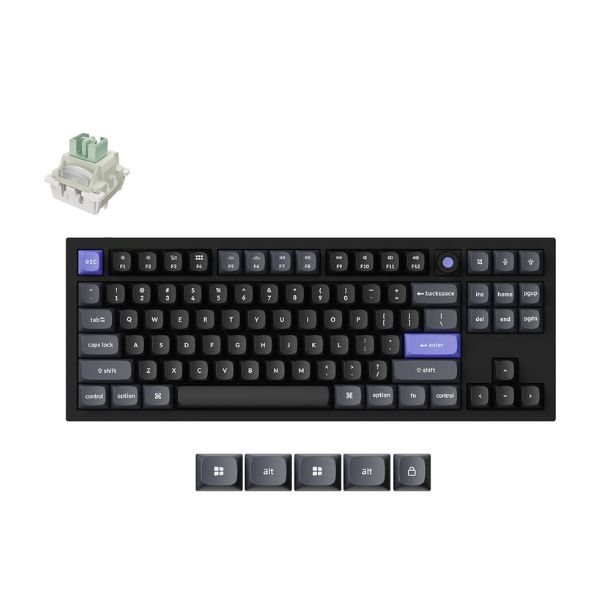
Keychron Q3 HE 8K – Full specification
Available
Pros & Cons
Pros
- 80% TKL layout fits Competitive Gaming, Work
- Listed switch setup: Keychron Ultra-Fast Lime Magnetic Switch
- Connectivity support: No / USB-C only
- Backlight listed: Per-key RGB
- Customization support: QMK / Keychron Launcher
Cons
- Release year should be verified before publishing
- Exact dimensions are not clearly listed
- Weight is not clearly listed
Specifications
Genral Info
| Brand | Keychron |
| Model Name | Q3 HE 8K |
| Series | Q HE 8K Series |
| Type | Wired Magnetic Hall Effect gaming keyboard |
| Layout | 80% TKL |
| Release Year | - |
| Use Case | Competitive Gaming, Work |
DESIGN & BUILD
| Frame Material | Full metal body |
| Plate Material | - |
| Keycap Material | Double-shot PBT |
| Color Options | - |
| Dimensions (L × W × H) | - |
| Weight | - |
| Form Factor | TKL / 80% |
| Finish | Premium metal finish |
SWITCH & TYPING EXPERIENCE
| Switch Type | Keychron Ultra-Fast Lime Magnetic Switch |
| Switch Options | Keychron Ultra-Fast Lime Magnetic |
| Mount Type | Double-gasket design |
| Stabilizers | Screw-in stabilizers |
| Number of Keys | - |
| Typing Angle | - |
| Key Rollover | NKRO |
| Actuation Force | Adjustable actuation |
| Key Travel | Adjustable actuation; magnetic switch travel |
| Typing Feel | Fast magnetic switch response with rapid trigger |
PERFORMANCE
| Response Time (Bluetooth) | 8000 Hz wired; 256KHz single-key scanning |
| Response Time (Bluetooth) | 8000 Hz wired; 256KHz single-key scanning |
| Anti-Ghosting | Yes |
| Input Lag | Near-zero latency wired gaming |
| Latency Mode | Wired low latency |
RGB & LIGHTING
| Backlight Type | Per-key RGB |
| LED Orientation | - |
| Lighting Effects | Multiple RGB effects |
| Custom Effects | Supported |
| Brightness Levels | Adjustable |
| Control | Keychron Launcher / onboard shortcuts |
SOFTWARE & CUSTOMIZATION
| Firmware | QMK / Keychron Launcher |
| Key Remapping | Fully programmable |
| Macro Support | Supported |
| Profile Storage | Onboard layers |
| Firmware Update | USB-C |
| Hotkey Shortcuts | RGB, media, layer switching |
SOUND & COMFORT
| Acoustic Dampening | Acoustic foams |
| Typing Sound Profile | Stable, damped gaming sound |
| Gasket Mount | Double-gasket |
| Noise Reduction | Foam dampening |
| Wrist Rest | Optional |
| Tilt Feet | - |
Support and compatibility
| Software Support | macOS, Windows, Linux |
| Supported OS | Mac / Windows support |
| Plug-and-Play | Yes |
| Layout Options | ANSI |
BATTERY & CONNECTIVITY
| Battery Capacity | Not applicable |
| Battery Type | Not applicable |
| Battery Life (No RGB) | Not applicable |
| Battery Life (RGB On) | Not applicable |
| Charging Port | USB-C |
| Charge Time | Not applicable |
| Wireless Mode | No |
| Wired Mode | USB-C only |
| Multi-Device Pairing | No |
| Switch Between Devices | No |
| Polling Rate (Wired) | 8000 Hz |
| Polling Rate (Wireless) | Not applicable |
More from Keychron
 Keychron Q1 HE – Full specificationSwitches Gateron Double-Rail Magnetic Nebula SwitchBacklight Per-key RGBMode 2.4 GHz + Bluetooth
 Keychron Q3 HE – Full specificationSwitches Gateron Double-Rail Magnetic Nebula SwitchBacklight Per-key RGBMode 2.4 GHz + Bluetooth
 Keychron V3 8K Keyboard – Specs, Features, Review & Final VerdictSwitches Mechanical (Hot-swappable)Backlight Per-key RGBMode Wired only
 Keychron K3 – Full specificationSwitches Low-profile Mechanical (Hot-swappable)Backlight Per-key RGBBattery Life 30–35 hours
 Keychron Q6 Max – Full specificationSwitches Mechanical (Hot-swappable 5-pin sockets)Backlight Per-key RGBBattery Life Up to 80 hours
 Keychron K2 HE – Full specificationSwitches Magnetic Hall Effect (Hot-swappable)Backlight Per-key RGBBattery Life Around 80 hours
 Keychron K2 – Full specificationSwitches Mechanical (Hot-swappable options available)Backlight White or RGB (depending on version)Battery Life Up to 72 hours
 Keychron K8 Pro – Full specificationSwitches Mechanical (Hot-swappable)Backlight Per-key RGBBattery Life 70–80 hours
 Keychron K3 Max – Full specificationsSwitches Low-profile mechanical (Hot-swappable MX style)Backlight Per-key RGBBattery Life 34–68 hours
 Keychron K3 Pro – Full specificationSwitches Gateron Low-profile Mechanical (Hot-swappable)Backlight Per-key RGBBattery Life 34 hours