Skip to content
  1. InputArena – Compare Mouse & Keyboard
  2. All Gadgets
  3. Keyboard
  4. Logitech MX Keys Mini – Full specification
Keyboard
Logitech MX Keys Mini – Full specification
Logitech Keyboard SKU: MX-Keys-Mini

Logitech MX Keys Mini – Full specification

Available Official 7.4/10Great
  • Switches Scissor switches (Logitech proprietary)
View Full Specs

Logitech MX Keys Mini

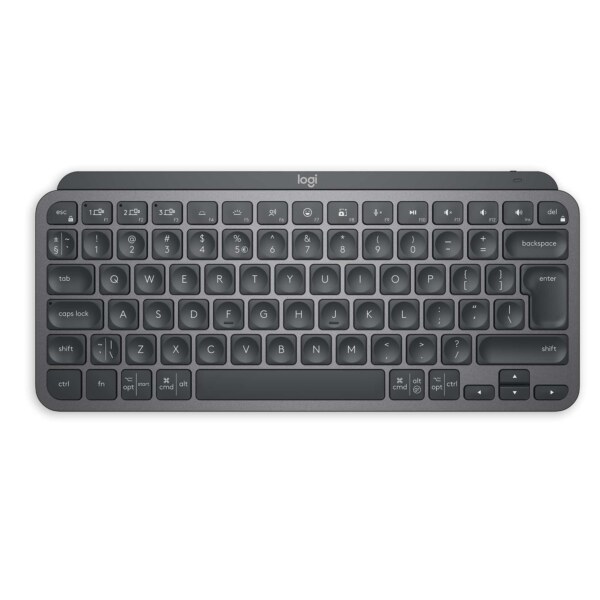
Logitech MX Keys Mini is a Compact (75%) layout without numeric keypad keyboard built for Work, Productivity, Travel. Its main listed strengths are Scissor switches (Logitech proprietary), USB Type-C, Metal top plate with plastic body. The main trade-off is that there is no dedicated number pad. This overview is based on the stored specification fields and avoids hands-on testing claims.

Pros & Cons

Pros
  • Compact (75%) layout without numeric keypad layout fits Work, Productivity, Travel
  • Listed switch setup: Scissor switches (Logitech proprietary)
  • Connectivity support: USB Type-C
  • Customization support: Available via software for some keys
Cons
  • Final buying decision depends on exact regional layout and switch variant

Our Rating Scores are set by our editors from the manufacturer-published specifications, not from hands-on testing.

7.4
/ 10 Good
Design 10
SWITCH 6
PERFORMANCE 7
BATTERY 7
Connectivity 7

Specifications

DESIGN & BUILD

Frame Material Metal top plate with plastic body
Keycap Material Low-profile keys with Perfect Stroke design
Color Options Graphite, Pale Gray, Rose
Dimensions (L × W × H) 296 × 132 × 21 mm
Weight 506 g
Form Factor Compact minimalist
Finish Matte texture

SWITCH & TYPING EXPERIENCE

Switch Type Scissor switches (Logitech proprietary)
Key Travel 1.8 mm
Typing Feel Quiet, fluid, precise keystrokes with spherically dished keys designed for fingertips

PERFORMANCE

Input Lag Negligible for productivity use

SOFTWARE & CUSTOMIZATION

Key Remapping Available via software for some keys
Macro Support Limited (as supported by Logi Options+)

SOUND & COMFORT

Typing Sound Profile Quiet with tactile feedback

Support and compatibility

Supported OS Windows 10 or later, macOS 10.15 or later, Chrome OS, Linux, iOS, iPadOS, Android
Plug-and-Play Yes

BATTERY & CONNECTIVITY

Battery Capacity 1500 mAh
Battery Type 1500 mAh Li-Po rechargeable battery
Charging Port USB Type-C
Charge Time Approx. 3 hours

⚡ Real-World Performance Analysis

Wired Mode
USB Type-C
Wired USB mode gives the most stable, consistent connection of the available modes.
Typing Response

Logitech MX Keys Mini should be judged by its Scissor switches (Logitech proprietary) feel, layout comfort and stabilizer/keycap setup. Listed feel: Quiet, fluid, precise keystrokes with spherically dished keys designed for fingertips. This is spec-based guidance, not a direct physical test claim.

Latency Notes

Wired or 2.4 GHz mode is the safer choice for latency-sensitive typing; Bluetooth remains better suited to everyday convenience.

Daily Use

For daily use, judge Logitech MX Keys Mini by layout comfort, switch feel, OS support and the keys you actually need.

📐 Layout Guide — Is This the Right Size For You?

LayoutCompact (75%) layout without numeric keypad
KeysNo dedicated number pad
Best UseCompact productivity and gaming

A 75% layout keeps useful keys in a compact footprint. It is good when you want function-row access without full TKL width.

Good fit if

  • You want a compact desk setup with useful dedicated keys.
  • You can live without a number pad.
  • You want more mouse space without going ultra-minimal.

Consider another size if

  • You need a full navigation cluster or number pad.
  • You dislike compact key spacing.
  • You want a very familiar full-size layout.

🧩 Switch & Build Quality — What You're Actually Getting

Switch
Scissor switches (Logitech proprietary)
Mechanical switch feel varies by the exact variant, spring weight and factory tuning. Check the exact switch variant before buying.
Key Travel
1.8 mm
Travel and typing feel vary somewhat by switch version.
Frame
Metal top plate with plastic body
Keycaps
Low-profile keys with Perfect Stroke design

Logitech MX Keys Mini is listed with Scissor switches (Logitech proprietary). Build and sound should be judged by the exact switch option, keycaps, stabilizers and case construction. Listed details include Frame/body: Metal top plate with plastic body; Keycaps: Low-profile keys with Perfect Stroke design.

🎮 Gaming Use Cases — How Does It Perform?

🎯FPS / Competitive Aim
Good if layout and latency mode fit

Logitech MX Keys Mini can work for FPS if the Compact (75%) layout without numeric keypad size gives enough mouse space and a wired or verified 2.4 GHz mode is available.

🧙MOBA / RPG Shortcuts
Good for standard shortcuts

MOBA and RPG use depends more on comfort, key layout and remapping support than on marketing labels.

🕹️Casual Gaming
Good for mixed use

For casual gaming, comfort and stable connection matter more than maximum polling claims.

🏆Competitive Notes
Verify before claiming competitive performance

Competitive-level latency depends on the exact mode, firmware and polling settings in use, more than the spec sheet alone.

👤 Who Should Buy This Keyboard?

Buy if

  • You want a Compact (75%) layout without numeric keypad keyboard for Work, Productivity, Travel.
  • You like the listed Scissor switches (Logitech proprietary) setup.
  • You can verify the exact regional/layout version before buying.

Skip if

  • You want the cheapest possible basic keyboard.
  • The listed layout does not include keys you use every day.
  • Switch feel, exact layout and warranty terms matter to you and can't be confirmed from photos alone.
  • You need a dedicated number pad for daily spreadsheet or data-entry work.

🛒 Practical Buying Advice

Before Buying

Before buying Logitech MX Keys Mini, confirm the exact layout, switch version, regional legends, included accessories and warranty.

Value Check

Logitech MX Keys Mini gives the most value if you will actually use its Compact (75%) layout without numeric keypad layout, Scissor switches (Logitech proprietary) setup and listed connection/software features.

Best Configuration

Choose the switch and layout version that fits your typing style. For gaming, prioritize wired or verified 2.4 GHz mode if available; for work, prioritize comfort and OS support.

What to Verify

Layout: Compact (75%) layout without numeric keypad
Switch: Scissor switches (Logitech proprietary)
Connectivity: USB Type-C
Battery: 1500 mAh
Dimensions: 296 × 132 × 21 mm
Weight: 506 g

Buying Call

Buy Logitech MX Keys Mini if the listed layout, switch feel and connectivity match your real desk setup. Skip it if you need a different size or only want a basic budget keyboard.

🏁 Final Verdict

Logitech MX Keys Mini: buy it if the layout and switch fit your setup

Logitech MX Keys Mini is worth considering if you want the listed Compact (75%) layout without numeric keypad layout and Scissor switches (Logitech proprietary) setup. The safest buying decision is to worth confirming exact switch version, layout, battery/runtime and warranty before buying.

Layout: Compact (75%) layout without numeric keypadSwitch: Scissor switches (Logitech proprietary)Connection: USB Type-C

💻 Compatibility & Software Notes

Supported OS
Windows 10 or later, macOS 10.15 or later, Chrome OS, Linux, iOS, iPadOS, Android

The software and OS fields reflect what's officially listed - remapping, wireless pairing and profile behaviour can vary by firmware version, so check the manufacturer's current documentation for specifics.

🔁 Alternatives to Consider

A full

size keyboard: choose this if you need a number pad and familiar office layout.

A compact 75% or 65% keyboard

choose this if desk space matters more than dedicated keys.

A Hall Effect gaming keyboard

compare if adjustable actuation and rapid trigger are your top priority.

A budget mechanical keyboard

choose this if price matters more than premium build or wireless features.

✅ Source / Verification Notes

Specifications on this page come from the manufacturer's published listing.

We have not physically tested this exact unit, so treat latency, battery life and typing feel as manufacturer claims rather than independently measured results.

❓ Frequently Asked Questions

Reviews

  • Be the first to add a Review

    Please post a user review only if you have / had this product.

  • Rate this Product

  • 8
  • 9
  • 9
  • 9
  • 8
  • 6 / 10 based on your selection
Scroll to Top