
- InputArena – Compare Mouse & Keyboard
- All Gadgets
- Compare
- Logitech M185 vs Logitech M171
Logitech M185 vs Logitech M171
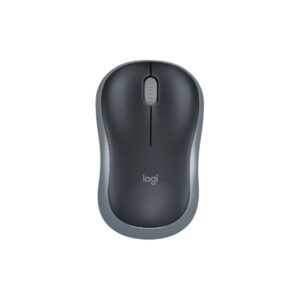
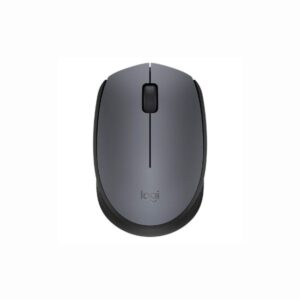
Logitech M185 vs Logitech M171
Logitech M185 vs Logitech M171 is mainly a choice between hand feel, wireless performance and everyday practicality rather than just the higher number on the spec sheet. Use this comparison to decide which mouse better matches your grip style, desk setup and sensitivity preference. The important checks are shape, weight balance, sensor/DPI range, polling support, button layout, battery claims and whether the included receiver or software matches your system. The imported comparison notes highlight: Logitech M171 and M185 are budget wireless mice with similar 1000 DPI sensors, 12-month battery life, and 10m range.
⚖️ Key Differences
- Logitech M185 should be judged first on comfort, shell size and whether its weight feels stable for your grip.
- Logitech M171 should be judged on whether its shape or upgraded feature set gives a real advantage for your daily use.
- Performance differences matter most for gaming: compare sensor class, DPI ceiling, polling rate support and wireless receiver requirements.
- For office or casual use, click feel, noise, battery life and plug-and-play reliability can be more important than maximum DPI.
- Before buying, confirm the exact regional bundle because some high-polling mice need a separate 4K or 8K dongle.
| Logitech Wireless Mouse M185 – Specification, Price and Review | Logitech M171 – Full specification | |
|---|---|---|
| Overview | ||
| Price | $14.99 | — |
| Our Rating | ||
| Brand | Logitech | Logitech |
| Category | Mouse | Mouse |
| Basic Information | ||
| Brand | Logitech | Logitech |
| Model Name | Wireless Mouse M185 | M171 Wireless Mouse |
| Release Year | N/A | 2019 |
| Category | — | Mouse |
| Grip Style | Ambidextrous | Palm, Claw |
| Ergonomics | Right- and left-handed users | Ambidextrous |
| Design Type | — | Compact |
| Color Options | Black, Grey, Red, Blue | Black, Grey, Red, Blue |
| Dimensions & Weight | ||
| Length | 99 mm (3.9 in) | 97.7 mm |
| Width | 60 mm (2.36 in) | 61.5 mm |
| Height | 39 mm (1.54 in) | 35.2 mm |
| Weight | 75.2 g (0.166 lbs) including battery | 70.5 g (with battery) |
| Material | Plastic (contoured matte finish) | Matte plastic |
| Feet Material | Standard plastic feet | Standard PTFE |
| Sensor & Performance | ||
| Sensor Type | Optical | Optical |
| Sensor Model | Advanced Optical Tracking | Not specified |
| Resolution (DPI) | 1000 DPI (fixed) | 1000 DPI (fixed) |
| Tracking Accuracy | Smooth optical tracking | Smooth optical tracking |
| Polling Rate | N/A (wireless) | 125 Hz (8 ms) |
| Max Tracking Speed | N/A | Not specified |
| Max Acceleration | N/A | Not specified |
| Lift-off Distance | N/A | Not adjustable |
| Click Latency | N/A | Standard |
| Onboard Memory | No | No |
| Switches & Buttons | ||
| Switch Type | Standard mechanical switches | Standard mechanical |
| Durability | N/A | Not specified |
| Total Buttons | 3 (Left, Right, Middle click) | 3 |
| Scroll Wheel | 2D optical scroll wheel (line-by-line scrolling) | 2D optical (line-by-line) |
| Side Buttons | No | None |
| Middle Click | Yes | Yes |
| Macro Support | No | No |
| Connectivity | ||
| Connection Type | Wireless 2.4 GHz radio via USB nano receiver | Wireless (2.4 GHz) |
| Cable Length | N/A | N/A |
| Cable Type | N/A | N/A |
| Wireless Receiver | USB nano receiver (plug and play) | Logitech Nano Receiver (USB-A) |
| Charging Port | No | N/A |
| Compatibility | Windows, macOS, Chrome OS, Linux | Windows 7+, macOS 10.11+, ChromeOS, Linux |
| Compatibility | ||
| Software | Optional Logitech Options+ customization app (Windows/macOS) | Logi Options+ (optional) |
| System Support | Windows Vista and later, macOS 10.5+, Chrome OS, Linux Kernel 2.6+ | Windows 7/8/10/11, macOS 10.11+ |
| Interface Required | USB port for nano receiver | USB-A port |
| Battery & Charging | ||
| Battery Type | 1 x AA alkaline battery (included) | 1 × AA battery (included) |
| Battery Life | Up to 12 months (typical) | Up to 12 Months |
| Charging Method | Replaceable battery | Replaceable battery |
| Charge Time | N/A | N/A |
| Smart Features | ||
| Smart Features | On/Off switch for power saving; Advanced 2.4 GHz wireless connectivity up to 10 meters; Plug-and-play with nano receiver; Contoured compact shape; No software required for basic use |
Plug-and-play nano receiver Reliable 2.4 GHz wireless (10 m range) Power on/off switch Ambidextrous symmetrical design No software required for basic use |
🧾 Side-by-Side Buying Summary
Choose Logitech M185 if you prefer its shape, size and feature balance over chasing every possible upgrade. It is the safer pick when its grip profile already matches your hand and the price is clearly lower than Logitech M171.
Choose Logitech M171 if its upgraded sensor, polling, battery, RGB or ergonomics match the way you actually use a mouse. It makes more sense when the extra features are included in the bundle, not sold separately.
Both models should be compared in real terms: comfort after long sessions, stable wireless connection, switch feel and the exact price available in your region. Do not buy only from the DPI headline.
⚡ Performance Comparison
Logitech M185 is best evaluated by tracking consistency, latency mode and whether its sensor settings are easy to control. If it already offers enough DPI/polling for your games, it can feel just as practical as the more expensive option.
Logitech M171 becomes the stronger performance pick only when its sensor, polling rate or firmware options are genuinely higher and supported by the included receiver. Otherwise, the difference may be small in normal desktop use.
For competitive gaming, check 1000 DPI. For normal productivity, any stable modern sensor is usually enough, so comfort and battery life become the deciding factors.
🧩 Design & Build Comparison
Logitech M185 should suit buyers who like its hand position, side shape and weight distribution. A lighter mouse can feel faster, but a slightly larger shell may be more comfortable for palm or relaxed claw grip.
Logitech M171 should suit buyers who want a different shell feel, more grip security or a more feature-rich body. The better design is the one that reduces finger strain and keeps aim consistent over time.
Mouse design cannot be judged from specs alone. Compare length, hump position, side curvature, button height and weight. If possible, match the dimensions to a mouse you already find comfortable.
🔌 Connectivity / Compatibility Notes
Logitech M185 is the better choice if its wireless mode is simple, stable and does not require extra setup. For work laptops, receiver storage and quick pairing are practical advantages.
Logitech M171 is better if it offers more flexible wireless modes, higher polling support or easier software control. Make sure those modes work on your PC or console before paying extra.
Check whether the box includes a USB receiver, USB-C cable, extender or high-polling dongle. Also confirm software support for DPI stages, debounce, lift-off distance and button remapping.
👥 Who Should Choose Which?
- You want the lower-cost option and Logitech M185 already has enough performance for your games or work.
- Your priority is comfort, battery life and simple setup instead of the highest polling number.
- You prefer its size or shape based on your hand length and grip style.
- You do not want to depend on extra dongles or complex software settings.
- You want the stronger feature set from Logitech M171 and the price difference is reasonable.
- You play fast shooters where sensor tuning, polling rate and low weight can matter.
- You specifically need its shape, RGB, button layout or wireless mode.
- You have confirmed that the required receiver and software support are included.
🛒 Practical Buying Advice
Buy the model that fits your hand first, then compare performance. A mouse with perfect specs but the wrong shape will feel worse than a cheaper model that fits correctly. For Logitech M185 and Logitech M171, verify the actual weight, sensor version, polling dongle, warranty and return policy from the seller page. If prices are close, choose the model with better wireless headroom; if there is a big gap, choose the one that already covers your DPI, battery and grip needs.
🏆 Winner by Use Case
Logitech M171 — choose it if the higher polling or sensor package is confirmed in the box.
Logitech M185 — choose it if it is cheaper and comfortable for long sessions.
Logitech M185 — pick the simpler, easier-to-carry option if portability matters.
whichever model is cheaper by a clear margin — comfort and warranty matter more than small spec gaps.
❓ Frequently Asked Questions
Is Logitech M171 automatically better than Logitech M185?
Not always. It is better only if its shape, wireless mode and performance features match your use case.
Which one should I choose for gaming?
Choose the model with the better sensor and polling support only after confirming that the required dongle and software are included.
What should I verify before buying either mouse?
Check exact weight, dimensions, receiver type, battery claim, switch type, warranty and return policy.
Does higher DPI make a mouse better?
No. DPI headroom is useful, but tracking quality, latency, shape and stability matter more in real use.
🏁 Final Verdict
The practical winner depends on price and hand fit. Pick Logitech M171 if you clearly need its stronger gaming features or more advanced wireless package. Pick Logitech M185 if it is more affordable and already matches your grip, battery and sensor needs. For most buyers, the better mouse is the one that feels controlled after two hours, not the one with the biggest number on the box.
✅ Source / Verification Notes
- Manual guide data is stored in the APS comparison guide meta fields, not only in post content.
- Use the product pages and seller listing to verify final specs, price, included accessories and regional variants before publishing.
- This text avoids lab-test claims unless those claims are present in your own product data or verified source notes.