
- InputArena – Compare Mouse & Keyboard
- All Gadgets
- Mouse
- Logitech Wireless Mouse M185 – Specification, Price and Review
Mouse
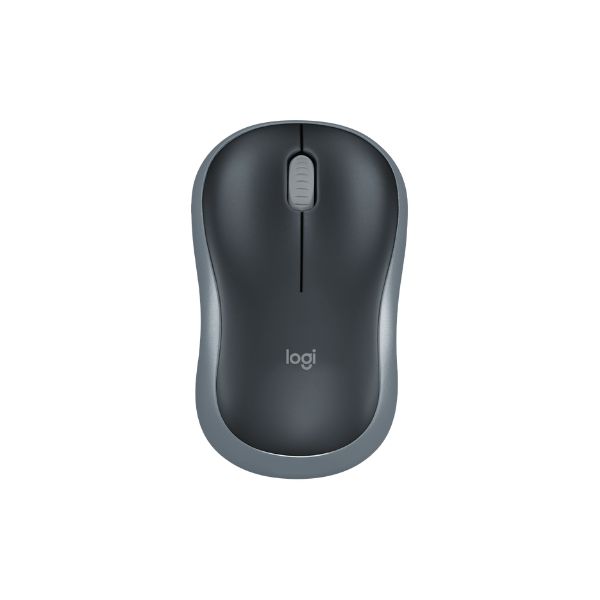
Logitech Wireless Mouse M185 – Specification, Price and Review
Available
Official
Pros & Cons
Pros
- 75.2 g (0.166 lbs) including battery listed weight (mid-weight class)
- Advanced Optical Tracking sensor is identified, making comparison easier
- Published battery guidance: Up to 12 months (typical)
Cons
- Fit is personal; compare 99 mm (3.9 in) × 60 mm (2.36 in) × 39 mm (1.54 in) with a mouse you already use
Specifications
Basic Information
| Brand | Logitech |
| Model Name | Wireless Mouse M185 |
| Release Year | N/A |
| Grip Style | Ambidextrous |
| Ergonomics | Right- and left-handed users |
| Color Options | Black, Grey, Red, Blue |
Dimensions & Weight
| Length | 99 mm (3.9 in) |
| Width | 60 mm (2.36 in) |
| Height | 39 mm (1.54 in) |
| Weight | 75.2 g (0.166 lbs) including battery |
| Material | Plastic (contoured matte finish) |
| Feet Material | Standard plastic feet |
Sensor & Performance
| Sensor Type | Optical |
| Sensor Model | Advanced Optical Tracking |
| Resolution (DPI) | 1000 DPI (fixed) |
| Tracking Accuracy | Smooth optical tracking |
| Polling Rate | N/A (wireless) |
| Max Tracking Speed | N/A |
| Max Acceleration | N/A |
| Lift-off Distance | N/A |
| Click Latency | N/A |
| Onboard Memory | No |
Switches & Buttons
| Switch Type | Standard mechanical switches |
| Durability | N/A |
| Total Buttons | 3 (Left, Right, Middle click) |
| Scroll Wheel | 2D optical scroll wheel (line-by-line scrolling) |
| Side Buttons | No |
| Middle Click | Yes |
| Macro Support | No |
Connectivity
| Connection Type | Wireless 2.4 GHz radio via USB nano receiver |
| Cable Length | N/A |
| Cable Type | N/A |
| Wireless Receiver | USB nano receiver (plug and play) |
| Charging Port | No |
| Compatibility | Windows, macOS, Chrome OS, Linux |
Compatibility
| Software | Optional Logitech Options+ customization app (Windows/macOS) |
| System Support | Windows Vista and later, macOS 10.5+, Chrome OS, Linux Kernel 2.6+ |
| Interface Required | USB port for nano receiver |
Battery & Charging
| Battery Type | 1 x AA alkaline battery (included) |
| Battery Life | Up to 12 months (typical) |
| Charging Method | Replaceable battery |
| Charge Time | N/A |
Smart Features
| Smart Features | On/Off switch for power saving; Advanced 2.4 GHz wireless connectivity up to 10 meters; Plug-and-play with nano receiver; Contoured compact shape; No software required for basic use |
Related Comparisons


More from Logitech
 Logitech M170 – Full specificationSensor Logitech Advanced Optical TrackingDPI 1000 DPI (fixed)Polling Rate 125 Hz
 Logitech M171 – Full specificationDPI 1000 DPI (fixed)Polling Rate 125 Hz (8 ms)Weight 70.5 g (with battery)
 Logitech M186 – Full specificationDPI 1000 DPI (fixed)Polling Rate 125 HzWeight 75 g (without battery) / 82 g (with AA battery)
 Logitech M220 – Full specificationSensor Logitech Advanced Optical TrackingDPI 1000 DPI (fixed)Polling Rate 125 Hz
 Logitech M317 – Full specificationSensor Logitech Advanced OpticalDPI 1000 DPI (fixed)Polling Rate 125 Hz (8 ms)
 Logitech M325 – Full specificationSensor Advanced Optical TrackingDPI 1000 DPIPolling Rate 125 Hz
 Logitech M235 – Full specificationSensor Advanced Optical TrackingDPI 1000 DPIPolling Rate 125 Hz
 Logitech M190 Full-Size Wireless – Specification, Price and ReviewSensor Standard Optical SensorDPI 1000 DPIWeight 90 g (0.2 lbs)
 Logitech M190 Full-Size WirelessSensor Standard Optical SensorDPI 1000 DPIWeight 90 g (0.2 lbs)
 Logitech M240 Silent Bluetooth Mouse – Specification, Price and ReviewDPI 400 – 4,000 (adjustable in 100 DPI steps)Weight 73.8 g (0.16 lbs)Connection Bluetooth Low Energy (no dongle required)