
- InputArena – Compare Mouse & Keyboard
- All Gadgets
- Compare
- Logitech MX Mechanical Mini vs Logitech MX Keys Mini
Logitech MX Mechanical Mini vs Logitech MX Keys Mini
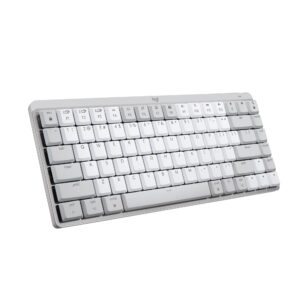
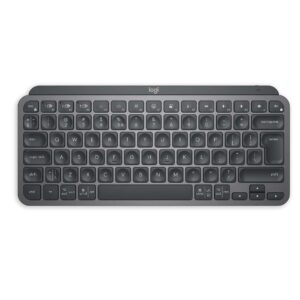
Genral Info
| Brand | Logitech |
| Model Name | MX Mechanical Mini |
| Series | MX Series |
| Type | Mechanical (Wireless) |
| Layout | 75% (Compact without Numpad) |
| Release Year | 2023-2025 |
| Use Case | Work, Productivity, Mobile Workstations |
DESIGN & BUILD
| Frame Material | Aluminum top case + Plastic base Metal top plate with plastic body |
| Plate Material | Plastic |
| Keycap Material | Low-profile matte keys Low-profile keys with Perfect Stroke design |
| Color Options | Graphite (Dark Gray) Graphite, Pale Gray, Rose |
| Dimensions (L × W × H) | 312.6 × 131.55 × 26.1 mm (including keycaps) 296 × 132 × 21 mm |
| Weight | 612 g 506 g |
| Form Factor | Compact 75% Compact minimalist |
| Finish | Matte texture Matte texture |
SWITCH & TYPING EXPERIENCE
| Switch Type | Low-profile Kailh Choc V2 switches Scissor switches (Logitech proprietary) |
| Switch Options | Tactile Quiet, Clicky, Linear |
| Mount Type | Fixed mount (non-hot-swappable) |
| Stabilizers | Standard stabilizers |
| Typing Angle | Adjustable legs (3.5° / 8°) |
| Key Rollover | 6-key rollover (Bluetooth mode) |
| Actuation Force | Approx. 42.64 g |
| Key Travel | 1.37 mm pre-travel, 3.25 mm total travel 1.8 mm |
| Typing Feel | Low-profile, quiet tactile feedback with smooth key presses Quiet, fluid, precise keystrokes with spherically dished keys designed for fingertips |
PERFORMANCE
| Response Time (Bluetooth) | Approx. 18.7 ms (Bluetooth), 15.2 ms (Logi Bolt) Approx. 18.7 ms (Bluetooth), 15.2 ms (Logi Bolt) |
| Anti-Ghosting | No ghosting reported |
| Input Lag | Low latency with Logi Bolt receiver Negligible for productivity use |
| Latency Mode | Yes, up to 3 devices (Easy-Switch) |
RGB & LIGHTING
| Backlight Type | White smart illumination (hand proximity sensor) |
| LED Orientation | Top-lit keys |
| Lighting Effects | Automatic ambient adjustment |
| Custom Effects | Smart ambient light sensor |
| Brightness Levels | Auto brightness levels |
| Control | No customizable RGB; automatic control only |
SOFTWARE & CUSTOMIZATION
| Firmware | Logi Options+ (customization) |
| Key Remapping | Key remapping via software Available via software for some keys |
| Macro Support | Macro support via Logi Options+ Limited (as supported by Logi Options+) |
| Profile Storage | App-based profile storage |
| Firmware Update | Firmware update supported |
| Hotkey Shortcuts | Media and device switching hotkeys |
SOUND & COMFORT
| Acoustic Dampening | Quiet tactile switches, minimal noise |
| Typing Sound Profile | Soft, restrained tactile 'thock' Quiet with tactile feedback |
| Noise Reduction | Noise reduction design for office use |
| Wrist Rest | Wrist rest compatible (MX Palm Rest) |
| Tilt Feet | Dual adjustable tilt feet |
Support and compatibility
| Software Support | Logi Options+ for Windows, macOS |
| Supported OS | Logi Options+ Windows 10 or later, macOS 10.15 or later, Chrome OS, Linux, iOS, iPadOS, Android |
| Plug-and-Play | Yes (plug-and-play) Yes |
| Layout Options | Windows and Mac dual layout support |
BATTERY & CONNECTIVITY
| Battery Capacity | 1500 mAh 1500 mAh |
| Battery Type | Lithium Polymer 1500 mAh Li-Po rechargeable battery |
| Battery Life (No RGB) | Up to 15 days (backlight on) |
| Battery Life (RGB On) | Up to 10 months (backlight off) |
| Charging Port | USB Type-C fast charging USB Type-C |
| Charge Time | Approx. 15 minutes quick charge for full day use Approx. 3 hours |
| Wireless Mode | Bluetooth 5.0, Logi Bolt USB Receiver |
| Wired Mode | Not supported (no wired mode) |
| Multi-Device Pairing | Up to 3 devices (Easy-Switch) |
| Switch Between Devices | Easy-Switch buttons |
| Polling Rate (Wired) | Not specified |
| Polling Rate (Wireless) | Not specified |
|