Skip to content
  1. InputArena – Compare Mouse & Keyboard
  2. All Gadgets
  3. Mouse
  4. Logitech MX Ergo S
Mouse
Logitech MX Ergo S

Logitech MX Ergo S

$100.00
Available Official 8.4/10Excellent
  • DPI 512 – 2048 (switchable DPI, precision/speed modes)
  • Polling Rate Not specified (standard wireless polling)
  • Weight 164 g (0.36 lbs) (without metal plate/receiver); 259 g (0.57 lbs) (with metal plate/receiver)
  • Connection Wireless (2.4 GHz Logi Bolt USB receiver) / Bluetooth Low Energy / Wired USB-C (charging only)
  • Grip Style Palm, Finger, Thumb control
View Full Specs

Logitech MX Ergo S

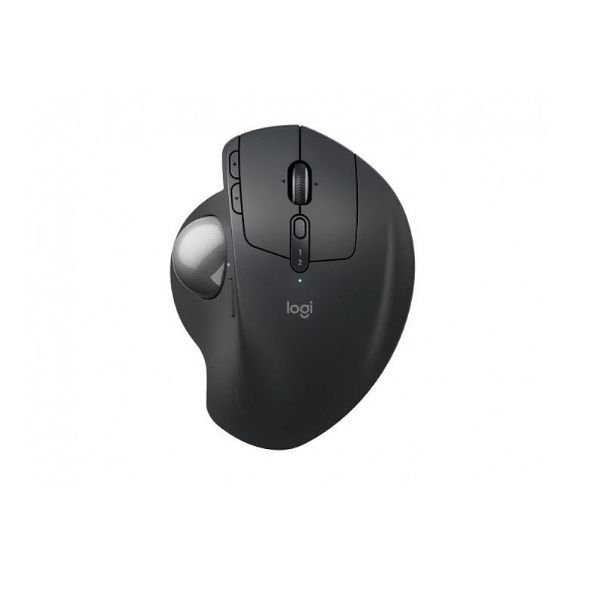
Logitech MX Ergo S is a heavier mouse built around the Optical (Logitech Advanced Optical Tracking) sensor with Wireless (2.4 GHz Logi Bolt USB receiver) / Bluetooth Low Energy / Wired USB-C (charging only). Its listed 164 g (0.36 lbs) (without metal plate/receiver); 259 g (0.57 lbs) (with metal plate/receiver) weight and 132.5 mm (5.22 in) × 99.8 mm (3.93 in) × 51.4 mm (2.02 in) dimensions make the Palm, Finger, Thumb control guidance central to the buying decision. The 512 – 2048 (switchable DPI, precision/speed modes) and Not specified (standard wireless polling) figures describe its configuration ceiling; they do not replace measured latency or comfort testing.

Pros & Cons

Pros
  • 164 g (0.36 lbs) (without metal plate/receiver); 259 g (0.57 lbs) (with metal plate/receiver) listed weight (heavier class)
  • Optical (Logitech Advanced Optical Tracking) sensor is identified, making comparison easier
  • Wired, 2.4 GHz and Bluetooth connection choices
  • Published battery guidance: Up to 120 days per charge (typical use)
Cons
  • Fit is personal; compare 132.5 mm (5.22 in) × 99.8 mm (3.93 in) × 51.4 mm (2.02 in) with a mouse you already use

Specifications

Basic Information

Brand Logitech
Model Name MX Ergo S
Release Year 2025
Grip Style Palm, Finger, Thumb control
Ergonomics Right-handed, 20-degree adjustable tilt (0°/20°)
Color Options Graphite

Dimensions & Weight

Length 132.5 mm (5.22 in)
Width 99.8 mm (3.93 in)
Height 51.4 mm (2.02 in)
Weight 164 g (0.36 lbs) (without metal plate/receiver); 259 g (0.57 lbs) (with metal plate/receiver)
Material Sculpted ergonomic soft rubber, matte-textured ABS
Feet Material Low-friction PTFE

Sensor & Performance

Sensor Type Optical (Logitech Advanced Optical Tracking)
Resolution (DPI) 512 – 2048 (switchable DPI, precision/speed modes)
Tracking Accuracy Precision thumb trackball, zero smoothing/acceleration
Polling Rate Not specified (standard wireless polling)
Max Tracking Speed Not specified
Max Acceleration Not specified
Lift-off Distance Not applicable (trackball)
Click Latency Standard wireless, optimized for office productivity
Onboard Memory Supports custom button profiles with Logi Options+

Switches & Buttons

Switch Type Quiet mechanical micro-switches
Durability Rated for millions of actuations
Total Buttons 8 Buttons (6 programmable via Logi Options+)
Scroll Wheel 4-way precision tilt mechanical wheel (horizontal/vertical scroll)
Side Buttons Customizable (forward/back, app-switch)
Middle Click Scroll wheel click (middle click)
Macro Support Yes (via Logi Options+)

Connectivity

Connection Type Wireless (2.4 GHz Logi Bolt USB receiver) / Bluetooth Low Energy / Wired USB-C (charging only)
Cable Length User-supplied USB-C cable (not included)
Cable Type Compatible with USB-C standard cables
Wireless Receiver Logi Bolt Nano Receiver (USB-A interface)
Charging Port USB-C (fast charging)
Compatibility Windows 10/11 or later, macOS 12 or later, ChromeOS, Linux, iPadOS 15+, Android 12+

Compatibility

Software Logi Options+ customization app (Windows/macOS)
System Support Requires USB-A port for receiver, Bluetooth for direct connection

Battery & Charging

Battery Type Built-in Lithium Polymer, 500 mAh
Battery Life Up to 120 days per charge (typical use)
Charging Method USB-C Wired (cable not included, works while charging)
Charge Time 1 minute quick charge for 24 hours use; approx. 2 hours for full charge

Smart Features

Smart Features Adjustable 0°/20° tilt, Quiet-click and tactile feedback, Switch cursor speed (precision/rapid tracking), Multi-device Easy-Switch, FLOW cross-computer file drag & drop, Customizable shortcut/macro assignment, Auto sleep power management, Battery status LED indicator

✋ Shape & Grip Guide — Is This Mouse Right for Your Hand?

ShapeRight-handed, 20-degree adjustable tilt (0°/20°)
Size132.5 mm (5.22 in) × 99.8 mm (3.93 in) × 51.4 mm (2.02 in)
Weight Feel164 g (0.36 lbs) (without metal plate/receiver); 259 g (0.57 lbs) (with metal plate/receiver) (heavier)
Best GripsPalm, Finger, Thumb control

Logitech MX Ergo S measures 132.5 mm (5.22 in) × 99.8 mm (3.93 in) × 51.4 mm (2.02 in) and is listed at 164 g (0.36 lbs) (without metal plate/receiver); 259 g (0.57 lbs) (with metal plate/receiver). The published grip guidance is Palm, Finger, Thumb control. Use those measurements against a familiar mouse; grip labels alone cannot predict comfort.

Good fit if

  • You already use Palm, Finger, Thumb control on a similarly sized shell.
  • You want a heavier mouse.
  • The Right-handed, 20-degree adjustable tilt (0°/20°) design matches your preferred hand position.

Consider another shape if

  • You cannot compare the dimensions with a mouse you already find comfortable.

🎯 Sensor & Tracking Quality — What You're Actually Getting

Sensor
Optical (Logitech Advanced Optical Tracking)
The sensor model is the most useful identifier when comparing tracking hardware.
DPI Range
512 – 2048 (switchable DPI, precision/speed modes)
Maximum DPI is an adjustment range, not a promise of better aim.
Polling Rate
Not specified (standard wireless polling)
Higher polling can reduce the interval between cursor updates when the system supports it.
Lift-off Distance
Not applicable (trackball)
Lift-off behaviour can vary with pad surface and calibration.

Optical (Logitech Advanced Optical Tracking) is the listed sensor. 512 – 2048 (switchable DPI, precision/speed modes) sets the available sensitivity ceiling. Not specified (standard wireless polling) is the stated polling range. The useful setting is the one that remains stable on your PC, receiver and mouse pad—not necessarily the maximum number.

🧩 Clicks, Buttons & Build Quality

Switches
Quiet mechanical micro-switches
Switch specifications identify the mechanism; sound and feel still require hands-on judgment.
Buttons
8 Buttons (6 programmable via Logi Options+)
Check placement as well as the total count.
Scroll Wheel
4-way precision tilt mechanical wheel (horizontal/vertical scroll)
Encoder type does not fully describe tactility or noise.
Mouse Feet
Low-friction PTFE
Glide also depends on the pad surface.
Shell / Body
Sculpted ergonomic soft rubber, matte-textured ABS
Material and construction affect mass and rigidity; coating feel is not inferred.

Switches: Quiet mechanical micro-switches. buttons: 8 Buttons (6 programmable via Logi Options+). wheel: 4-way precision tilt mechanical wheel (horizontal/vertical scroll). body: Sculpted ergonomic soft rubber, matte-textured ABS. The listed feet material is Low-friction PTFE. Treat feel, noise and long-term durability as untested unless a hands-on test is explicitly cited.

🔋 Wireless & Battery — What to Expect

Connection
Wireless (2.4 GHz Logi Bolt USB receiver) / Bluetooth Low Energy / Wired USB-C (charging only)
Use wired or 2.4 GHz for latency-sensitive play; Bluetooth prioritizes convenience.
Battery Life
Up to 120 days per charge (typical use)
Runtime varies with polling rate, lighting, sleep settings and battery age.
Charging
USB-C Wired (cable not included, works while charging)
Confirm cable and charger compatibility in the regional package.
Receiver / Dongle
Logi Bolt Nano Receiver (USB-A interface)
Use the intended receiver for the advertised wireless polling modes.

Logitech MX Ergo S supports Wireless (2.4 GHz Logi Bolt USB receiver) / Bluetooth Low Energy / Wired USB-C (charging only). The published runtime is Up to 120 days per charge (typical use).

👤 Who Should Buy This Mouse?

Buy if

  • You specifically want the Optical (Logitech Advanced Optical Tracking) platform.
  • A 164 g (0.36 lbs) (without metal plate/receiver); 259 g (0.57 lbs) (with metal plate/receiver) mouse suits your handling preference.
  • Wireless (2.4 GHz Logi Bolt USB receiver) / Bluetooth Low Energy / Wired USB-C (charging only) matches the devices you use.
  • Your grip and hand size match the Palm, Finger, Thumb control guidance.

Skip if

  • The 132.5 mm (5.22 in) × 99.8 mm (3.93 in) × 51.4 mm (2.02 in) shell is a poor match for your hand.

🛒 Practical Buying Advice

Before Buying

Compare 132.5 mm (5.22 in) × 99.8 mm (3.93 in) × 51.4 mm (2.02 in), 164 g (0.36 lbs) (without metal plate/receiver); 259 g (0.57 lbs) (with metal plate/receiver), button placement and grip guidance with a mouse you already know.

Value Check

Judge value at the current regional price against mice with the same Optical (Logitech Advanced Optical Tracking), connection modes and warranty.

Best Configuration

Start at 1000 Hz and raise polling only if Not specified (standard wireless polling) remains stable on your system. Set DPI for control rather than chasing the maximum figure.

What to Verify

Confirm the exact regional model, package contents, receiver, supported software and warranty before checkout.

Buying Call

Choose Logitech MX Ergo S if its heavier weight, shape, connection options match your setup; otherwise prioritize fit over headline sensor numbers.

🏁 Final Verdict

Logitech MX Ergo S: the fit matters more than the maximum DPI

Logitech MX Ergo S's clearest strengths on paper are 164 g (0.36 lbs) (without metal plate/receiver); 259 g (0.57 lbs) (with metal plate/receiver) weight, Optical (Logitech Advanced Optical Tracking), Not specified (standard wireless polling) and Wireless (2.4 GHz Logi Bolt USB receiver) / Bluetooth Low Energy / Wired USB-C (charging only). The deciding risk is fit: confirm the dimensions, grip style and software support before treating the specification sheet as a recommendation.

Weight: 164 g (0.36 lbs) (without metal plate/receiver); 259 g (0.57 lbs) (with metal plate/receiver)Sensor: Optical (Logitech Advanced Optical Tracking)Polling: Not specified (standard wireless polling)Connection: Wireless (2.4 GHz Logi Bolt USB receiver) / Bluetooth Low Energy / Wired USB-C (charging only)

💻 Compatibility & Software Notes

Software
Logi Options+ customization app (Windows/macOS)
Supported OS
Requires USB-A port for receiver, Bluetooth for direct connection
Profiles / Memory
Supports custom button profiles with Logi Options+

Configuration support is listed as Logi Options+ customization app (Windows/macOS) on Requires USB-A port for receiver, Bluetooth for direct connection. Features and operating-system support can change with firmware, so use the current manufacturer download page.

✅ Source / Verification Notes

✓

This page distinguishes published specifications from hands-on test results.

✓

Shape comfort, click feel, wireless stability and battery life can vary by user, firmware and test method.

❓ Frequently Asked Questions

Reviews

  • Be the first to add a Review

    Please post a user review only if you have / had this product.

  • Rate this Product

  • 8
  • 8
  • 8
  • 8
  • 8
  • 6 / 10 based on your selection
Scroll to Top